Guides Search

SearXNG: web search your agent owns

Self-host SearXNG with Docker, switch on the JSON API and give your agent web search over MCP — no per-query bill, and no silent collapse to one engine.

  • IntermediateLevel
  • 30 minTo set up
  • DockerYou install SearXNG
SearXNG: web search your agent owns

Every agent that can search the web is paying someone per query for the privilege, or it is scraping and getting blocked. SearXNG is the third option: a metasearch engine you run, that asks other search engines on your behalf and hands you JSON. Point your agent at it and the per-query bill goes to zero.

Updated 3 November 2026

What it uses

No kit. One container.

SearXNG is not a POCKETCORP kit — you stand it up yourself, on what your server already has.

DockerIncludedAlready on your POCKETCORP. SearXNG is one container: a 387 MB image that idled at 115 MiB of RAM here and peaked at 146 MiB under load.
Your agent speaks MCPIncludedSo the search server is one command to register, and the four search tools show up in the same chat you already use.
A shell on the same machineIncludedWhich is what the last two steps need: reading the instance's own error statistics, editing its config and restarting the container.

Set it up

Step by step.

Step 101

The quickstart breaks, and it is worth understanding why

The question this guide answers was asked in public and never really answered. Under the SearXNG thread on Hacker News, a commenter called goodroot wrote: “This appears to be a key tool for providing search to local models. I’m curious what setups folks use to provide this functionality.” So: start the way the project’s own compose file tells you to, with the config directory bind-mounted and Linux capabilities dropped.

docker-compose.yml — the official quickstart
services:
  searxng:
    image: searxng/searxng:2026.11.2-cccbc9e15
    container_name: searxng
    ports:
      - "127.0.0.1:8080:8080"
    volumes:
      - ./searxng:/etc/searxng:rw
    cap_drop:
      - ALL
    cap_add:
      - CHOWN
      - SETGID
      - SETUID
terminal
$ docker compose up -d
 Container searxng Started

$ docker compose ps
searxng   Restarting (1) 6 seconds ago

$ docker compose logs
... "/etc/searxng/settings.yml" does not exist, creating from template...
cp: can't create '/etc/searxng/settings.yml': Permission denied
!!! ERROR
!!! "/etc/searxng/settings.yml" is not a valid file, exiting...

Here is what is happening. Docker created ./searxng for you, owned by uid 977 — the container’s own user — with mode 755. The entrypoint then tries to write the default config into it as root. Normally root walks through a permission check like that without noticing, because root holds the DAC_OVERRIDE capability. The quickstart drops it. You can watch the capability do the work:

terminal — the same write, with and without DAC_OVERRIDE
$ docker run --rm --cap-drop ALL -v $PWD/searxng:/etc/searxng \
    --entrypoint sh searxng/searxng:2026.11.2-cccbc9e15 \
    -c 'touch /etc/searxng/probe && echo WROTE || echo DENIED'
DENIED

$ docker run --rm --cap-drop ALL --cap-add DAC_OVERRIDE -v $PWD/searxng:/etc/searxng \
    --entrypoint sh searxng/searxng:2026.11.2-cccbc9e15 \
    -c 'touch /etc/searxng/probe && echo WROTE || echo DENIED'
WROTE

Step 202

The arrangement that works

Write the config file yourself, before the first start, and mount that single file read-only. A read-only bind mount cannot be chowned, so the file stays yours.

write the config first
mkdir -p ~/searxng && cd ~/searxng

cat > settings.yml <<EOF
use_default_settings: true

server:
  secret_key: "$(openssl rand -hex 32)"
  limiter: false

search:
  formats:
    - html
    - json
EOF
docker-compose.yml — the version that starts
services:
  searxng:
    image: searxng/searxng:2026.11.2-cccbc9e15
    container_name: searxng
    restart: unless-stopped
    ports:
      - "127.0.0.1:8080:8080"
    volumes:
      # one file, read-only: the container cannot take ownership of it,
      # so you can still edit it tomorrow
      - ./settings.yml:/etc/searxng/settings.yml:ro
    environment:
      - SEARXNG_BASE_URL=http://localhost:8080/
  • use_default_settings: true makes your file an overlay. SearXNG merges it over its own defaults, so six lines is a complete configuration and upgrades do not silently revert to a stale copy of a thousand-line template.
  • limiter: false turns off the bot-protection rate limiter. It exists to stop strangers hammering a public instance; yours is bound to 127.0.0.1 and its only client is your own agent, which looks exactly like a bot and would be throttled.
  • The image tag is pinned to a date. SearXNG has no release tags at all — the repository had commits on 1 and 2 November 2026 and not a single version tag — so the Docker tags are YYYY.M.D-<short-sha> and there can be several in one day. latest means “whatever landed most recently”.
terminal
$ docker compose up -d
$ ls -ln settings.yml
-rw-r--r-- 1 1000 1000 176 Nov  3 12:46 settings.yml      # still yours

$ curl -s -o /dev/null -w '%{http_code}\n' \
    'http://127.0.0.1:8080/search?q=test&format=json'
200
Step 303

Using it

Visit http://127.0.0.1:8080/ over an SSH tunnel and it is a search engine, with a preferences page and no account. The part that matters for an agent is the JSON.

terminal
$ curl -s 'http://127.0.0.1:8080/search?q=sablier+on+demand&format=json'
{
  "query": "sablier on demand",
  "results": [
    {
      "title": "GitHub - sablierapp/sablier: Start your containers on demand...",
      "url": "https://github.com/sablierapp/sablier",
      "engines": ["brave", "google cse"],
      "score": 4.0
    }
  ],
  "unresponsive_engines": [["duckduckgo", "CAPTCHA"]]
}

Read that last field. It was in the very first query of the run, and it is the beginning of the real story.

Step 404

Wiring it to your agent

mcp-searxng puts an MCP server in front of the JSON API. Version 2.9.0 shipped on 27 October 2026 and needs Node 22 or newer.

terminal
$ claude mcp add searxng -s local \
    -e SEARXNG_URL=http://localhost:8080 \
    -- npx -y mcp-searxng@2.9.0

$ claude mcp list
Checking MCP server health…
searxng: npx -y mcp-searxng@2.9.0 - ✔ Connected

Four tools arrive with it: searxng_web_search, searxng_search_suggestions, searxng_instance_info, and web_url_read, which fetches a URL and hands back the text. Search and read, which between them is most of what an agent wants the web for.

One thing nobody mentions: a default search is enormous. These are the payloads the agent actually receives, three calls back to back on the same query.

one query, three ways
CallCharacters≈ tokens
default23,6625,915
num_results=52,686671
num_results=5, result_detail=compact1,754438

Then the default call ran five more times a few minutes later and returned 9,041 characters, repeatably, varying by 17 characters across the five. Same query, same config, a third of the size — what changed was which engines happened to answer. So the only payload size you can count on is the one you impose yourself. An agent that searches six times during a task has bought back thirty thousand tokens of room to think in.

Step 505

What changes when the agent has the box

Everything above you could do on a laptop. This is the part you cannot. Go back to unresponsive_engines: SearXNG keeps error statistics at /stats/errors, and the picture there was worse than one flaky engine.

/stats/errors
EngineFailureShare of requests
duckduckgoCAPTCHA85%
duckduckgoVQD missed15%
braveToo many requests, suspended 180s20%

DuckDuckGo fails 100% of the time from this box. Next question: which engines were actually carrying the results, across three queries?

terminal
$ python3 engines.py
engines that returned results:
   google cse           60 results
engines enabled but returning nothing:
   brave (Suspended: too many requests)       failed in 3/3 queries
   duckduckgo (CAPTCHA)                       failed in 3/3 queries

The config reports 261 engines enabled. Fifty-six are in the general category, and of those exactly three are real web search engines by default — brave, duckduckgo, google cse — the rest being dictionaries, Wikipedia and currency converters. Two of the three were dead. So this metasearch engine was one search engine wearing a trenchcoat, and nothing said so: the page looked fine and returned twenty results a query. It is what baranul was complaining about in that same thread when he wrote that SearXNG “needs better quality control”, and what vimredo meant about hosted instances giving “results that were complete garbage.”

An agent with a shell on the box can do something about it, because the diagnosis is three commands and the repair is a config file it can edit and a container it can restart. It enabled eleven more general engines and measured which ones answer a datacenter IP.

eleven more engines, tried from this box
AnsweredRefused
bing, seznam, yahoo, mwmbl, wibyqwant (CAPTCHA), fireball, searchmysite, zapmeta (access denied), yep (HTTP error), crowdview (silence)

The four that carried real volume went into settings.yml and the rest were switched off, because an enabled engine that never answers costs you latency and nothing else. wiby returned a single result across three queries and did not earn its place.

settings.yml — the engines block
engines:
  # Measured on this box, 2026-11-03.
  - name: bing
    disabled: false
  - name: seznam
    disabled: false
  - name: yahoo
    disabled: false
  - name: mwmbl
    disabled: false
  - name: duckduckgo   # CAPTCHA on 100% of queries
    disabled: true
  - name: qwant        # CAPTCHA
    disabled: true
six queries, before and after
Default configAfter
Results per query (median)2044
Engines contributing15
Median latency0.61s1.20s
RAM115 MiB146 MiB
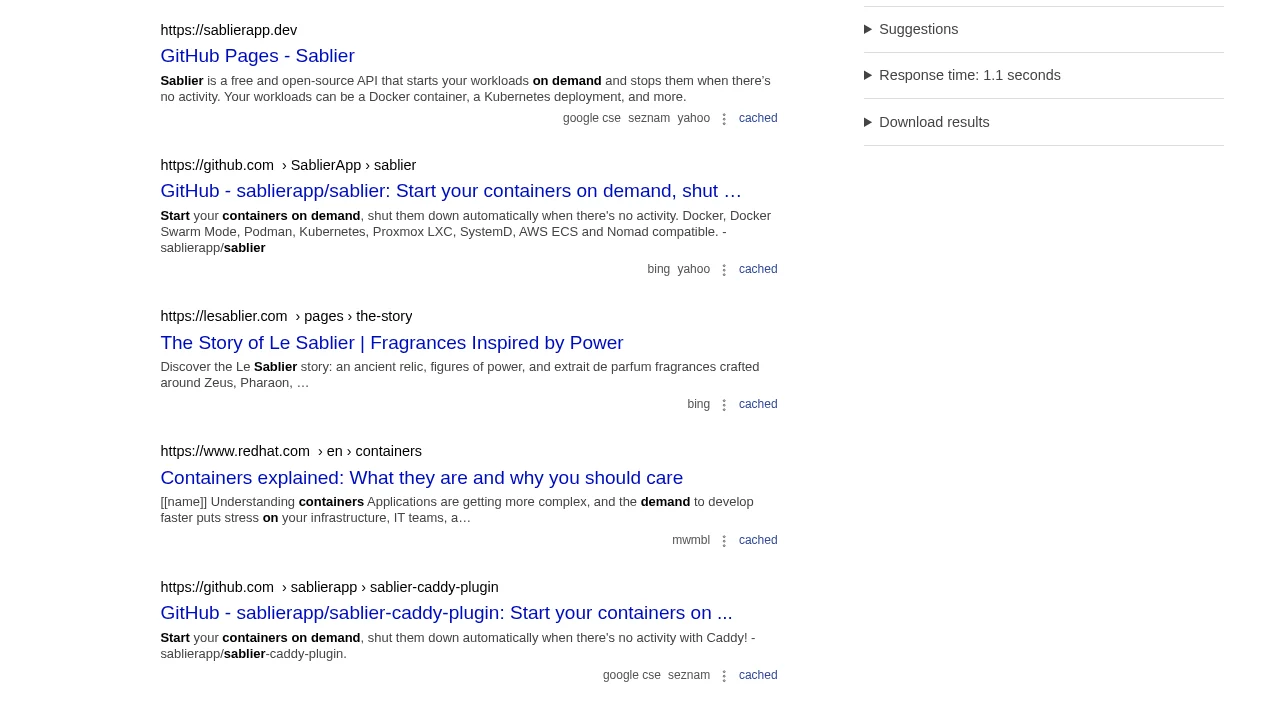
SearXNG results page after tuning, each result labelled with the engines that returned it
The tuned instance. Each result carries the engines that returned it — which is the field that gives the collapse away when there is only ever one name under every result.

Twice the results from five independent sources, for twice the wait. That trade is real and it might not be the one you want: a search that takes 1.2 seconds is a second your agent spends not thinking. If you care more about latency than coverage, keep bing and seznam and stop there.

What makes this your agent’s job rather than yours is that it is never finished. Engines rot. brave was fine in the first query of the morning and rate-limited by the afternoon, and it was the benchmarking in this guide that got it suspended. A box that can read its own error statistics, edit its own config and restart its own container can keep a search engine healthy on a schedule. You cannot, because you will not notice: the failure mode is not an error page, it is quietly getting fewer answers.

Step 606

What this guide could not verify

Two other honest edges. brave is still suspended in the “after” numbers, so the real ceiling is six engines rather than five. And denysvitali, who maintains a competing MCP server for SearXNG, put the general limitation better than this guide can, in that same thread: it “works very well, until you get rate limited by the providers.” Nothing here makes you immune to that. It moves the problem somewhere you can see it and fix it, which is different from solving it.

Sources. The question, the JSON-format detail and the quoted limitations come from Hacker News, 3 July 2026. Release details are from mcp-searxng v2.9.0 and the SearXNG commit log. Every command and every number above came off one box on 3 November 2026.

Then just ask

Your setup, at work.

Send these to your agent in the chat on your POCKETCORP page, or from Telegram or WhatsApp. Change the details to yours.

Check what is actually answering
Run six searches against my SearXNG instance and tell me which engines returned results and which failed, with the error for each. Read /stats/errors as well.
Keep searches small
When you search, use num_results=5 and result_detail=compact unless I ask for a deep search. Tell me roughly how much context a search is costing you.
Read a page
Search for the current SearXNG settings.yml documentation, then read the best result and summarise just the engine options.

Take it further

Make it yours.

The same setup, doing more: ask for these once it runs.

Try new engines from this box
Enable the general engines that are off by default, run three queries, and tell me which ones answered from this server's IP and which refused. Then turn off the ones that returned nothing.
Watch it weekly
Every Monday at 8:00, check my SearXNG error statistics. If an engine has failed more than half its requests for a week, disable it, restart the container and message me what changed.
Pin the upgrade
SearXNG has no release tags, so check for a newer dated image, tell me what changed since the pinned one, and only update after I say yes.

The result

A search engine of your own on localhost, answering your agent in JSON for nothing per query, from five engines that were each checked against this machine rather than assumed.

Your agent is ready when you are.

SearXNG: web search your agent owns runs on a POCKETCORP: a computer of its own for your AI agent. Base is free for 14 days.